
📊 Calculate Your Canvas Grade with Accuracy
Why Use This Canvas Grade Calculator?
- Calculate your current Canvas grade instantly.
- Estimate your final course grade before the semester ends.
- Find the score needed on your final exam to reach a target grade.
- Support weighted assignments and grading categories.
- Track academic progress more effectively.
🤔 What Is a Canvas Grade Calculator?
A Canvas Grade Calculator is an academic planning tool that helps students estimate their current course grade, predict future outcomes, and understand how individual assignments, quizzes, projects, and exams affect their overall performance in Canvas LMS courses.
Instead of manually calculating weighted percentages, the calculator automatically combines your scores and grading categories to provide accurate grade estimates within seconds. This allows students to track progress throughout the semester and make informed decisions about upcoming coursework.
Whether you want to determine your current standing, calculate the grade needed on a final exam, or test different “what-if” scenarios, a Canvas Grade Calculator provides a simple way to monitor academic performance and stay focused on your grade goals.
Example
-
Homework Average: 88% (20%)
-
Quizzes: 92% (30%)
-
Midterm Exam: 85% (20%)
-
Final Exam: 90% (30%)
Estimated Final Course Grade: 89.1%
By understanding how each category contributes to the final grade, students can prioritize high-impact assignments and prepare more effectively for important exams.
Processing your grades...
📊 Enhanced Canvas Grade Calculator
Course Setup
Assignments / Categories
| Name | Score (%) | Weight (%) | Drop? | Actions |
|---|---|---|---|---|
|
|
||||
Results & Analysis
Personalized Study Tips & Suggestions
Study Tips
Improvement Suggestions
Share Your Results
Preview:
All calculations update automatically as you type. Total weights must equal 100% for accurate results.
📖 How to Use the Canvas Grade Calculator
Using the Canvas Grade Calculator is simple. Follow the steps below to calculate your current grade, estimate future performance, and determine the score needed to achieve your target course grade.
- Step 1
- Step 2
- Step 3
- Step 4
- Step 5
- Step 6
Step 1: Configure Your Course Settings
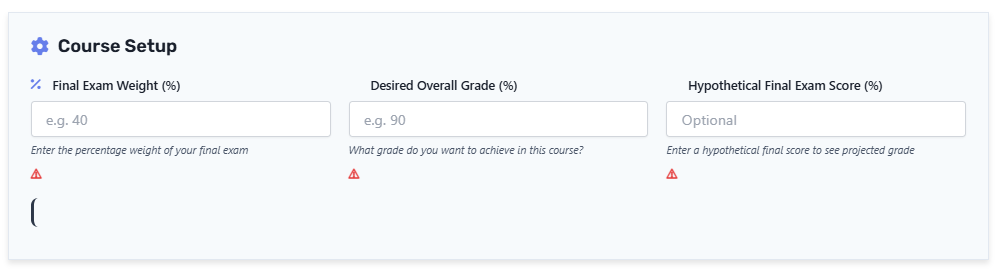
Start by entering your course information in the calculator. Add the percentage weight of your final exam and choose the overall grade you want to achieve in the course. If you’d like to test a possible exam outcome, you can also enter a hypothetical final exam score.
What you’ll enter:
- Final exam weight
- Desired overall grade
- Optional hypothetical final exam score
This information helps the calculator estimate your projected course performance.
Step 2: Add Assignments and Grading Categories
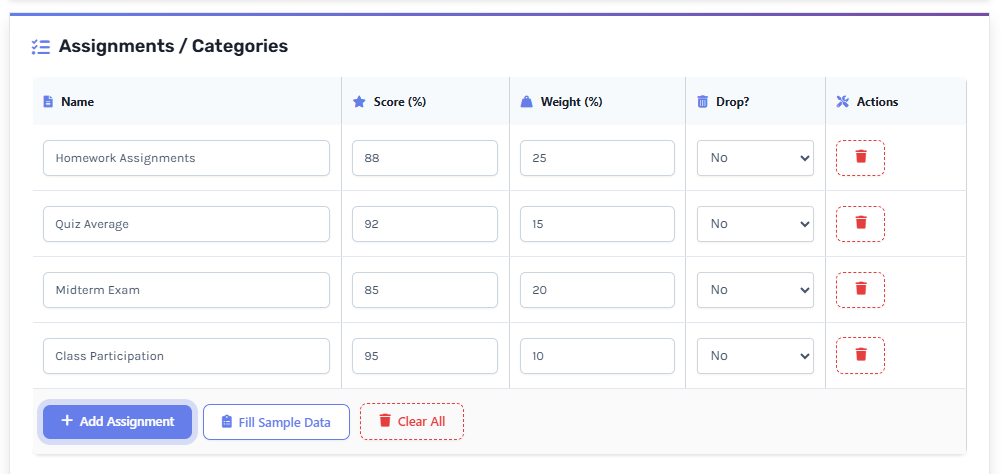
Enter each assignment category along with its score and weight. You can include homework, quizzes, projects, participation grades, midterms, or any other grading component used in your Canvas course.
For accurate calculations, ensure that all assignment weights plus the final exam weight equal 100%.
Common categories include:
- Homework Assignments
- Quizzes
- Midterm Exams
- Projects
- Participation
- Final Exam
Step 3: Review Your Current Grade
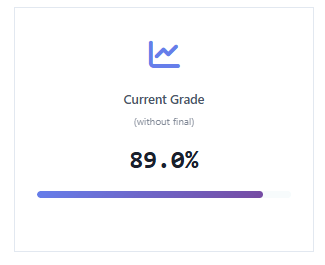
Once your scores are entered, the calculator automatically displays your current grade before the final exam. This gives you a clear picture of your current academic standing without performing manual calculations.
You’ll also see your current letter grade and GPA equivalent when available.
Step 4: Predict Your Final Course Grade
Want to know how a future exam score might affect your grade?
Enter a hypothetical final exam score and the calculator will instantly estimate your projected final course grade. This feature is useful for testing different academic scenarios before important exams.
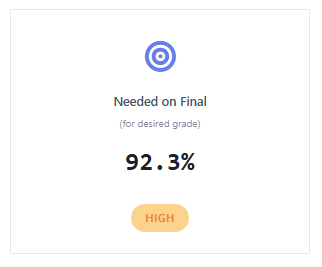
Step 5: Find the Score Needed on Your Final Exam
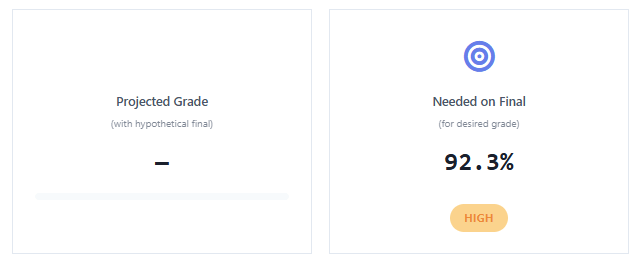
Set your desired course grade and let the calculator determine exactly what score you need on the final exam to reach your goal.
This feature helps students create realistic study targets and prioritize preparation for high-weight assessments.
Step 6: Analyze and Export Your Results
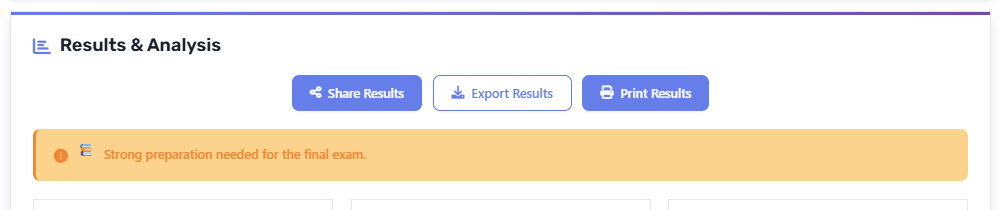
After completing your calculations, review the detailed grade analysis provided by the calculator. You can also export, print, or share your results for future reference.
Understanding your grade breakdown makes it easier to identify strengths, weaknesses, and opportunities for improvement.
Final Tip
Before relying on any estimate, double-check that all assignment scores and category weights are entered correctly. Accurate input data leads to the most reliable grade predictions and helps you make better academic decisions throughout the semester.
Want more than just calculations?
Get the Canvas Student Success Toolkit and manage your GPA, assignments, deadlines, finals, and semester planning from one organized system.
📊 How Canvas Calculates Grades
Canvas LMS grades are calculated using a weighted grading system, where each assignment category contributes a specific percentage to your final course grade.
Instead of simply averaging all scores, Canvas assigns different weights to categories such as homework, quizzes, midterms, projects, and final exams. Each category’s average score is multiplied by its assigned weight, and the results are combined to form your overall grade.
📌 Example of Weighted Breakdown
-
Homework → 20%
-
Quizzes → 30%
-
Midterm Exam → 30%
-
Final Exam → 20%
Each category is first converted into a percentage score, then multiplied by its weight. The final grade is the sum of all weighted values.
🎯 Key Point
This means that even if you perform well in smaller assignments, high-weight categories like midterms and finals have a much bigger impact on your overall grade.
Understanding this system helps students focus on the most important parts of their course instead of treating all assignments equally.
🧮 How To Calculate Canvas Grades Manually
You can manually calculate your Canvas grade by using a simple weighted average formula. This helps you verify your grade or estimate your performance without relying on the calculator.
📌 Formula
📊 Step-by-Step Example
Let’s say your course has the following breakdown:
- Homework: 90% (20%)
- Quizzes: 85% (30%)
- Midterm: 80% (30%)
- Final Exam: 70% (20%)
Now calculate each part:
- Homework → 90 × 20 = 1800
- Quizzes → 85 × 30 = 2550
- Midterm → 80 × 30 = 2400
- Final → 70 × 20 = 1400
Now add them:
- Total = 8150 ÷ 100 = 81.5%
🎯 Result
Your final course grade = 81.5%
This method shows exactly how Canvas processes grades behind the scenes, helping you understand where your performance is strongest or weakest.
🎯 What Grade Do I Need On My Final Exam?
One of the most common questions students ask is: “What do I need on my final exam to get my target grade?”
Canvas Grade Calculators solve this by reversing the weighted formula to determine the exact score required on your final exam.
📌 Example Scenario
-
Current Grade (before final): 84%
-
Final Exam Weight: 30%
-
Desired Overall Grade: 90%
📊 Result
To reach your target grade, you would need approximately:
Final Exam Score Required → 98.2%
🎯 What This Means
If your current performance is strong, you may only need a high but achievable score on your final exam. However, if your current grade is lower, the required final score will be significantly higher.
💡 Why This Is Important
This feature helps students:
-
Set realistic study goals
-
Understand how important the final exam is
-
Focus preparation based on actual requirements
-
Avoid guesswork before exams
Instead of guessing, you get a clear, data-driven answer in seconds.
📊 Example: Weighted Grade Calculation in Canvas
To understand how Canvas calculates grades in a real situation, let’s look at a simple course example with weighted categories.
📘 Course Setup
-
Homework (20%) → 90%
-
Quizzes (30%) → 85%
-
Midterm Exam (30%) → 88%
-
Final Exam (20%) → Not yet taken
📊 Current Grade (Before Final Exam)
Based on completed work only:
Current Grade (without final): 87.4%
Estimated Letter Grade: B+ (3.3 GPA)
This shows that the student is currently performing above the target level.
🎯 Required Final Exam Score
To achieve a final overall grade of 80%, the student would need approximately:
Required Final Exam Score → 50.5%
This means even an average performance on the final exam would be enough to maintain the desired grade.
💡 Key Insight
This example demonstrates how Canvas uses weighted grading:
-
Each category contributes differently based on its weight
-
Strong early performance reduces pressure on the final exam
-
The final exam has a measurable impact on the overall result
Instead of guessing, students can clearly understand what they need to achieve before the exam.
⚠️ Common Canvas Grade Calculation Mistakes Students Make
When using a Canvas Grade Calculator, even small input errors can lead to incorrect results. Understanding these common mistakes helps you get more accurate grade estimates and better academic planning.
⚠️ 1. Incorrect Weight Totals
A frequent mistake is entering assignment weights that do not add up to 100%. Since Canvas uses a weighted system, any imbalance can distort your final grade calculation.
⚠️ 2. Missing Assignments or Categories
Leaving out even a single assignment category—such as quizzes, participation, or projects—can significantly affect your overall grade result, especially in weighted courses.
⚠️ 3. Misunderstanding Weighted Grading
Not all assignments carry equal importance. Many students mistakenly assume all tasks are equally weighted, which leads to unrealistic expectations about their final grade.
⚠️ 4. Confusing Points with Percentages
Canvas Grade Calculators work with percentages, not raw points. Entering points instead of percentages can produce misleading results.
⚠️ 5. Ignoring Extra Credit
Extra credit can improve your overall grade slightly, especially when you are near a grade boundary. Forgetting to include it may result in a lower estimate.
⚠️ 6. Ignoring Dropped Scores
Some courses automatically drop the lowest quiz or assignment score. If this rule is not considered, your calculated grade may not match your actual Canvas LMS grade.
💡 Final Tip
Always double-check your inputs before relying on any calculation. Accurate data entry ensures more reliable results and helps you make better study decisions throughout the semester.
🎯 Smart Academic Planning Using the Canvas Grade Calculator
Using a Canvas Grade Calculator is not just about checking numbers — it also helps students make smarter academic decisions throughout the semester.
Understanding your current performance allows you to focus on what matters most and improve your results strategically.
📊 Focus on What Matters Most
-
Prioritize high-weight assignments like midterms and final exams
-
Identify weak areas early, such as quizzes or homework
-
Track performance by category instead of only overall grade
📚 Study More Effectively
Instead of studying everything equally, focus on topics and assignments that have the biggest impact on your final grade. This helps you use your time more efficiently and improve results faster.
🎯 Plan Ahead for Exams
Final exams often carry significant weight in Canvas courses. Using the calculator to estimate required scores helps you set realistic goals and reduce last-minute stress.
💡 Key Insight
When students understand how grades are calculated, they can study smarter, not harder — leading to better academic performance and more confident decision-making throughout the course.
Important Disclaimer
This calculator is designed for educational and estimation purposes only. While it helps you calculate current grades, predict final exam scores, and estimate GPA outcomes, official results may vary based on instructor grading methods, Canvas LMS settings, extra credit policies, rounding rules, and assignment adjustments.
For the most accurate estimates, always enter updated and correct grade information. This tool is intended to support smarter academic planning and progress tracking — not replace your official course gradebook.
Why wait? Start calculating now and see the difference!
📌 Canvas Grade Calculator – FAQs :
❓ How does the Canvas Grade Calculator work?
The Canvas Grade Calculator works by using your assignment scores along with their respective weights to calculate your overall course grade. It applies the weighted grading system used in Canvas LMS to estimate your current grade, predict final exam outcomes, and calculate the score needed to reach your target grade.
❓ Can I calculate weighted grades in Canvas?
Yes. This calculator is designed specifically for weighted grading systems used in Canvas LMS. You can enter different assignment categories such as homework, quizzes, projects, midterms, and final exams with their percentage weights to get an accurate grade calculation.
❓ Can this calculator predict my final exam grade?
Yes. You can enter a hypothetical final exam score to see how it will impact your overall course grade. This helps you understand what score you need on your final exam to achieve your desired final grade.
❓ Why is my calculated grade slightly different from Canvas?
Small differences may occur due to instructor-specific settings in Canvas LMS. These can include hidden assignments, extra credit, dropped lowest scores, or rounding rules that slightly affect the final grade shown in your official gradebook.
❓ Does this tool support GPA estimation?
Yes. The calculator can convert your percentage grade into an estimated letter grade and GPA range. This helps students better understand their academic performance in terms of standard grading systems.
❓ Can I use this calculator on mobile devices?
Absolutely. The Canvas Grade Calculator is fully responsive and works on all devices including smartphones, tablets, laptops, and desktops without requiring any installation.
❓ Is the Canvas Grade Calculator free to use?
Yes. The tool is completely free to use. You can calculate current grades, test what-if scenarios, estimate final exam requirements, and view GPA estimates without any charges.
Explore More Grade Calculators
Calculate grades easily across popular learning management systems. Choose your LMS calculator below to track scores, estimate final grades, and improve academic performance.
Canvas Grade Calculator
Calculate your Canvas grades instantly, track assignment scores, and estimate your final course grade with an easy-to-use calculator.
Calculate Canvas GradeBlackboard Grade Calculator
Calculate Blackboard grades, understand weighted scores, and predict your final course performance quickly.
Calculate Blackboard GradeMoodle Grade Calculator
Track Moodle grades, calculate weighted scores, and see how assignments affect your overall course grade.
Calculate Moodle GradeBrightspace Grade Calculator
Calculate Brightspace grades and monitor your academic progress with accurate grade predictions.
Calculate Brightspace GradeSchoology Grade Calculator
Estimate Schoology grades, calculate scores, and stay updated on your academic performance.
Calculate Schoology GradeGoogle Classroom Grade Calculator
Calculate Google Classroom grades and easily understand your current course standing.
Calculate Google Classroom GradeSakai Grade Calculator
Calculate Sakai grades, track coursework results, and predict your final academic outcome.
Calculate Sakai GradeInfinite Campus Grade Calculator
Calculate Infinite Campus grades and understand your overall academic progress.
Calculate Infinite Campus GradePowerSchool Grade Calculator
Calculate PowerSchool grades, convert scores, and track your academic performance easily.
Calculate PowerSchool GradeD2L Grade Calculator
Calculate D2L Brightspace grades and estimate your final course results accurately.
Calculate D2L Grade